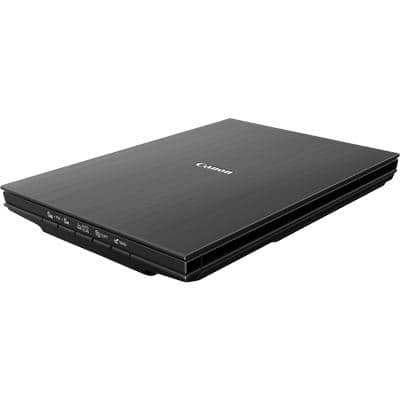
Digitising Documents Made Simple: Our Canon LiDE 400 Scanner Review
Buy Now On AmazonAs an Amazon Associate, we earn from qualifying purchases.
In an increasingly digital world, we still find ourselves dealing with paper documents more often than we'd like. Whether it's contracts, receipts, handwritten notes, or old photos, having a reliable scanner at your desk can save countless trips to the office printer room. We've been using the Canon LiDE 400 flatbed scanner for several months, and here's what we think.
Why We Needed a Scanner
Working remotely means dealing with paperwork differently. Signing contracts, archiving receipts for expenses, or simply keeping digital backups of important documents - these tasks pop up more frequently than you'd expect. We wanted something compact that wouldn't dominate desk space but could handle occasional scanning needs efficiently.
What We Tested
The Canon LiDE 400 is a colour flatbed scanner designed for home and small office use. It's part of Canon's LiDE series known for their slim profile and USB-powered operation.
Key Features
- USB Type-C connectivity - Modern connection, single cable for power and data
- No power adapter needed - Runs entirely from USB power
- Slim, space-saving design - Stands upright when not in use
- One-touch operation - Four EZ buttons for common tasks
- Auto document fix - Software enhancement for clearer scans
Our Experience
The Good
Setup: Getting started was genuinely straightforward. Connect the USB-C cable, install the software, and you're scanning within minutes. No hunting for power outlets or dealing with bulky adapters.
Size and Storage: The slim profile is a real selling point. When not in use, it stands upright like a book on your desk or slides into a drawer. For those of us with limited desk real estate, this matters.
Scan Quality: For documents and receipts, the quality is more than adequate. Text comes out crisp and readable, which is exactly what you need for archiving. Photos scan reasonably well too, though dedicated photo scanners would offer better results for serious photography work.
Speed: Scanning a standard A4 document takes about 8 seconds at 300dpi. It won't win any speed records, but for occasional use, it's perfectly acceptable.
Software: Canon's scanning software is functional without being bloated. The auto-fix features do help clean up document scans, correcting for slight skewing and enhancing text clarity.
Considerations
No Automatic Document Feeder: This is a flatbed-only scanner. If you regularly need to scan multi-page documents, you'll be lifting the lid for each page. For high-volume scanning, you'd want something with an ADF.
USB-C Cable Length: The included cable is fairly short. Depending on your setup, you might need a longer one or a USB hub.
Software Installation: While setup is simple, the Canon software does require downloading drivers. This is standard for scanners, but worth noting.
Who Should Consider This?
- Remote workers who occasionally need to scan documents
- Anyone wanting to digitise old photos or paperwork
- Small home offices with limited desk space
- Those who prefer a single USB-C connection without power adapters
- Users who value simplicity over high-volume features
The Verdict
The Canon LiDE 400 does exactly what it promises - it's a compact, easy-to-use flatbed scanner that handles everyday scanning tasks without fuss. The USB-C powered design means one less cable and adapter to worry about, and the slim form factor is genuinely space-friendly.
It's not designed for heavy-duty office scanning or professional photo archiving, but for the typical home office user who needs to scan documents a few times a week, it's a solid choice. Sometimes the best tools are the ones that just work without demanding attention, and the LiDE 400 fits that description well.
For our team, it's become the go-to solution for quickly digitising paperwork, and we appreciate that it doesn't take up permanent desk space when not in use.